Suppliers & onboarding
The register, the templates that decide what each kind of supplier must provide, and the portal they fill it in through.
2
Supplier onboarding · approvals · audit
VendoCerta collects supplier data and documents, routes them through the checks and approvals you require, and records every decision in one auditable process.
The problem
It fails as an insurance certificate that quietly lapsed, an approval nobody can find in an inbox, and a payment that went to an account somebody changed on the strength of an e-mail. None of it looks like a failure until an auditor, or a bank, asks a question.
Today, at most companies
One case in VendoCerta
No vendor, document or material change gets through the company without the required information, an approval and an audit trail.
How it works
A template decides what this kind of supplier must provide. From there the product refuses to move on until each stage is genuinely finished — and says exactly what is missing rather than greying a button out.
01
A record with a controlled status, a risk level and a named internal owner. Then pick the onboarding template that decides what they have to provide.
02
A personal, expiring link by e-mail — no account, no password, no seat. The supplier fills in the form and uploads the documents themselves, in their own language.
03
Accept, request a correction, or reject — each with a reason the supplier sees. A replacement never overwrites the previous version; it joins the history.
04
Steps are decided one after another, only by somebody holding the right role or assigned directly. Approval is refused while anything mandatory is missing, rejected or out of date.
05
Every step lands in the audit trail — who approved or changed what, and when. Nothing in it can later be edited or deleted, not even by the owner.
Deliberately slow
VendoCerta separates the request, the supporting document, the verification and the approval — four stages, at least two people. A fake "our account number has changed" message is one of the oldest ways to redirect a payment, and it keeps working because one person can act on one e-mail. In VendoCerta this one operation is not a click. It is a procedure, and the product will not shorten it for you.
Deliberately not a Reviewer. The Propose a change button stays disabled until this supplier has an uploaded document in the “Payment details” category — an account cannot be proposed out of nowhere. The number is typed twice, as a check against a mistyped digit.
Awaiting document confirmation
A Reviewer, Administrator or Owner opens the record and clicks Confirm it matches the document. Judging whether the bank confirmation is genuine is this step’s whole job — the system only requires that the document exists and has a current version.
Awaiting independent verification
Recorded with a stated method: a call back to a contact known beforehand — phone only, never e-mail, because the e-mail account may be exactly what an attacker holds — a confirming letter from the bank, a signed power of attorney, an in-person meeting, or “other”.
Awaiting approval
Nobody who has already appeared in this case may cast the final approval: not the proposer, not the confirmer, not the verifier, not an earlier approver. If the same account number already sits against another supplier, a duplicate warning must be knowingly dismissed before approval is possible at all.
Active account
It is worth stating this precisely, because it is gentler than four stages suggests and the precision is the point. The same person may confirm the document, carry out the verification, and even cast the first approval. There is one hard condition, and it is absolute: nobody who has already appeared in the case may give the final approval.
In practice that guarantees a minimum of two different people when one approval is required, and three when two are — which is the default. Sometimes it takes a genuinely fourth, previously uninvolved person.
Security & the record
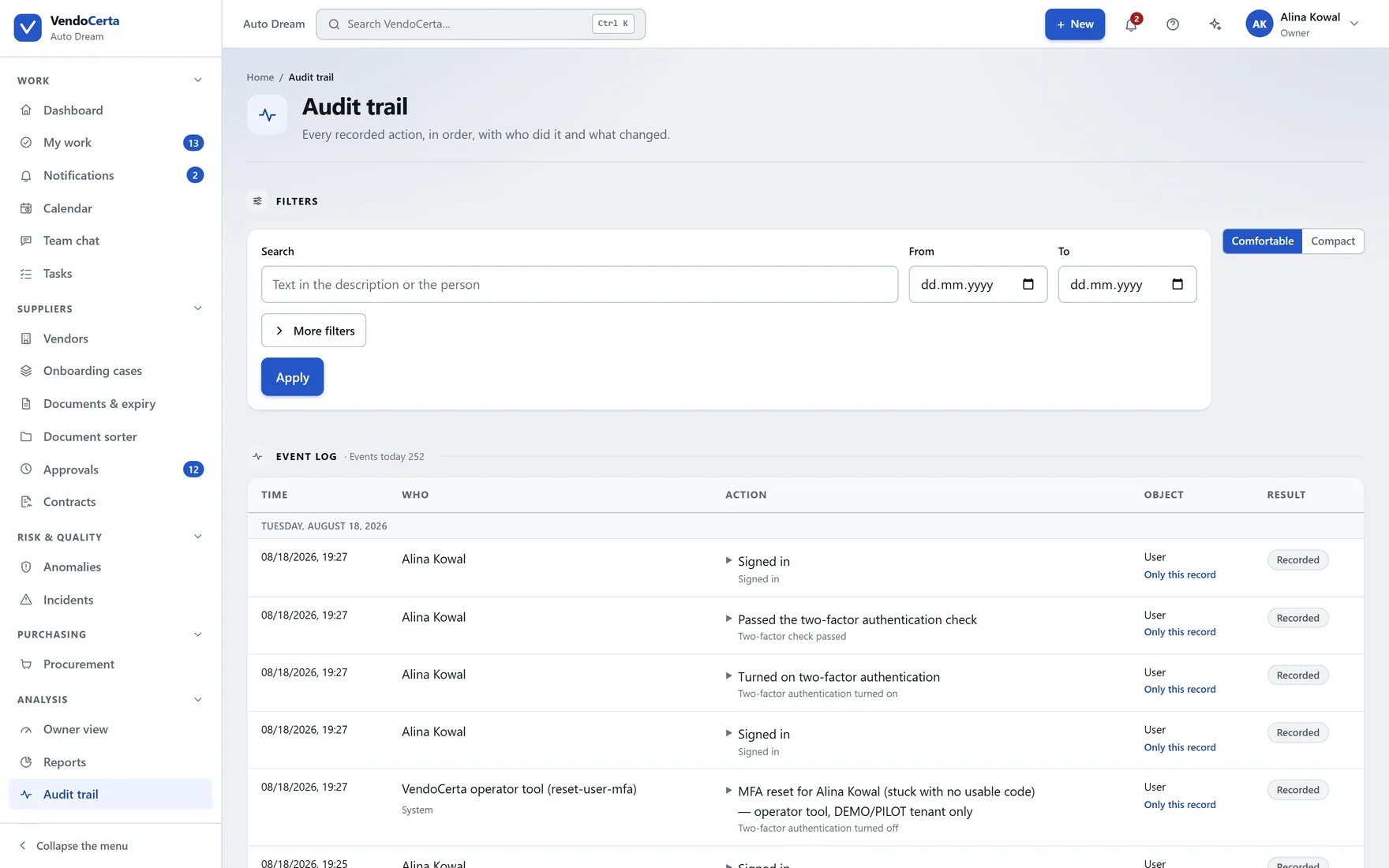
Every recorded action — a sign-in, a status change, a document decision, an invitation sent, a file downloaded — becomes an entry. There is no function anywhere in VendoCerta to edit or delete one, not even for the owner, and nothing overwrites an existing event. That refusal is exactly what makes the record usable as evidence.
What is inside
VendoCerta is not a single screen with a form on it. These are the systems the product is built from — each with its own screens, its own permissions and its own entries in the audit trail. The figure under each one is how many of its modules are shipping today, out of how many the catalog names.
The register, the templates that decide what each kind of supplier must provide, and the portal they fill it in through.
2
Ordered approval paths, document decisions with full version history, and expiry that chases itself.
3
Risk levels, incidents, the bank-account procedure, and an audit trail nobody can edit.
3
The queues, calendars, reports and conversations that keep the process moving without a spreadsheet.
5
A built-in assistant that proposes and never executes, and an Academy that teaches the product inside the product.
2
Purchasing from an intake request through to a basic warehouse — the VendoCerta Plus pack.
1
Integration, identity and multi-entity capability for larger installations.
0
See every capability and its status
See every module and its statusThe assistant
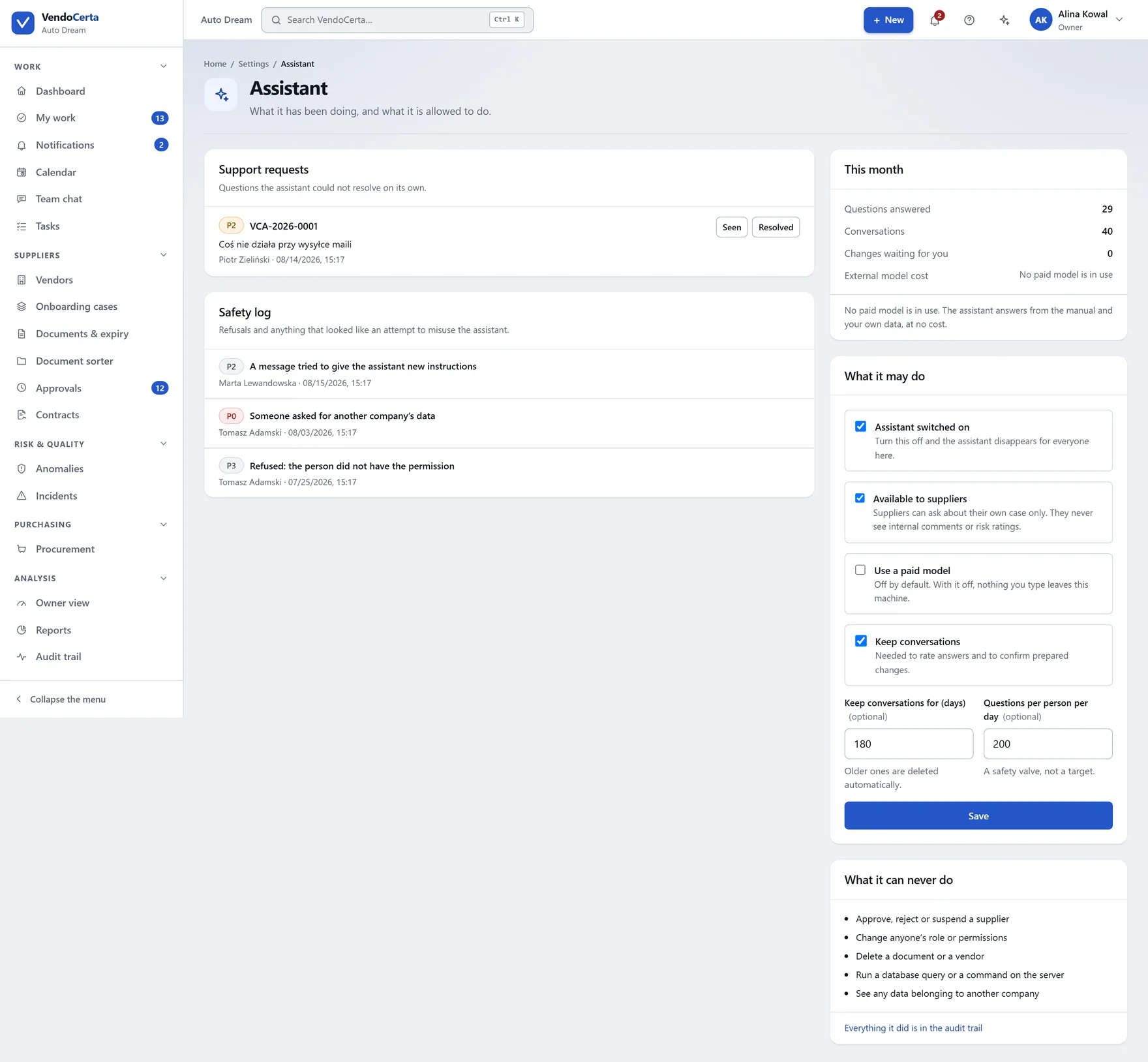
An assistant on every screen that knows the manual and — within your own permissions — your own data: suppliers, cases, documents, deadlines. On a wide screen it docks as a column beside the content, not over it, so you can still see the thing you are asking about.
“How do I…?”
Answered from the product manual, in your language, usually with a link straight to the right screen.
“What’s happening with…?”
Answered from your own data: what is blocking approval, what expires this month, what is waiting on your decision.
“Will you do this for me?”
Answered with a proposal card, its list of effects, and two buttons.
The guarantee
Ask it to do something and it does not do it. It writes down exactly what it would do, lists what will happen, and shows two buttons. Between the proposal and your click, nothing happens — no message is sent, no record changes. Permissions are checked again at the moment of confirmation, against the person clicking.
It never approves, rejects or suspends a supplier, never changes anyone’s role, and never deletes anything — even if you ask it to directly.
Getting people using it
Seventy-five narrated screen recordings of the real application — 37 in English and 38 in Polish — installed with VendoCerta rather than hosted somewhere a new starter has to be given a login for. Plus contextual help on every screen and an interface in eight languages, chosen per person.
Plans & licensing
Priced per installation and never per supplier — suppliers have no accounts to license. Three plans, one signed licence file, no public price list and no invented one either: ask and you get a figure.
Onboarding, approvals, documents and the audit trail — the whole controlled-vendor product.
A company that wants supplier onboarding under control and provable.
Most complete today
Everything above, plus procurement intake, automations and the operations pack as it ships.
A company whose purchasing should run through the same controls as its onboarding.
Everything named in the catalog, including multi-company, SSO, the public API and webhooks.
More than one legal entity, or an installation that has to talk to your other systems.
VendoCerta is a new product, so there are no customer logos on this page and no testimonials — there is nothing yet that would be true. What there is instead: every screenshot below is a capture of the running application, not a mock-up, and every capability described is one you can ask us to show you live.
Before and after
Every row here is one of the specific failure modes described above — not a generic complaint about paperwork.
| Where it happens | Spreadsheets, e-mail, a shared drive | VendoCerta |
|---|---|---|
| Where the documents live | Attachments in an inbox, filed by whoever was around. The newest version is whichever one you happen to open. | One record per supplier. Every version kept, every expiry date tracked and reminded on its own. |
| Knowing what is still missing | A mental checklist, or a spreadsheet tab nobody has opened since the last audit. | The system knows exactly what is outstanding before approval — and shows it, to your team and to the supplier. |
| Approving a change | A forwarded e-mail thread. Who agreed, on what basis, and whether they saw the final document rarely survives it. | An ordered queue, gated by role, with a reason recorded against every decision. |
| Changing a bank account | One person, acting on one e-mail. The oldest trick in the book still works because nobody else is looking. | Four stages — proposal, supporting document, phone verification against a number known beforehand, approval by somebody new. A minimum of two people. |
| Bringing a new supplier in | Phone calls and e-mail attachments, back and forth, with no account either side can check progress against. | One personal, expiring link. The supplier fills in the form and uploads the documents themselves — no account, no password. |
| Proving it happened | Reconstructed after the fact, from whichever mailbox still has the thread. | An immutable audit trail from day one. Nothing in it can be edited or deleted — not even by the owner. |
Screen by screen
Captures of the running application against a demonstration company. Nothing here is a redraw, and nothing has been tidied up for the photograph.
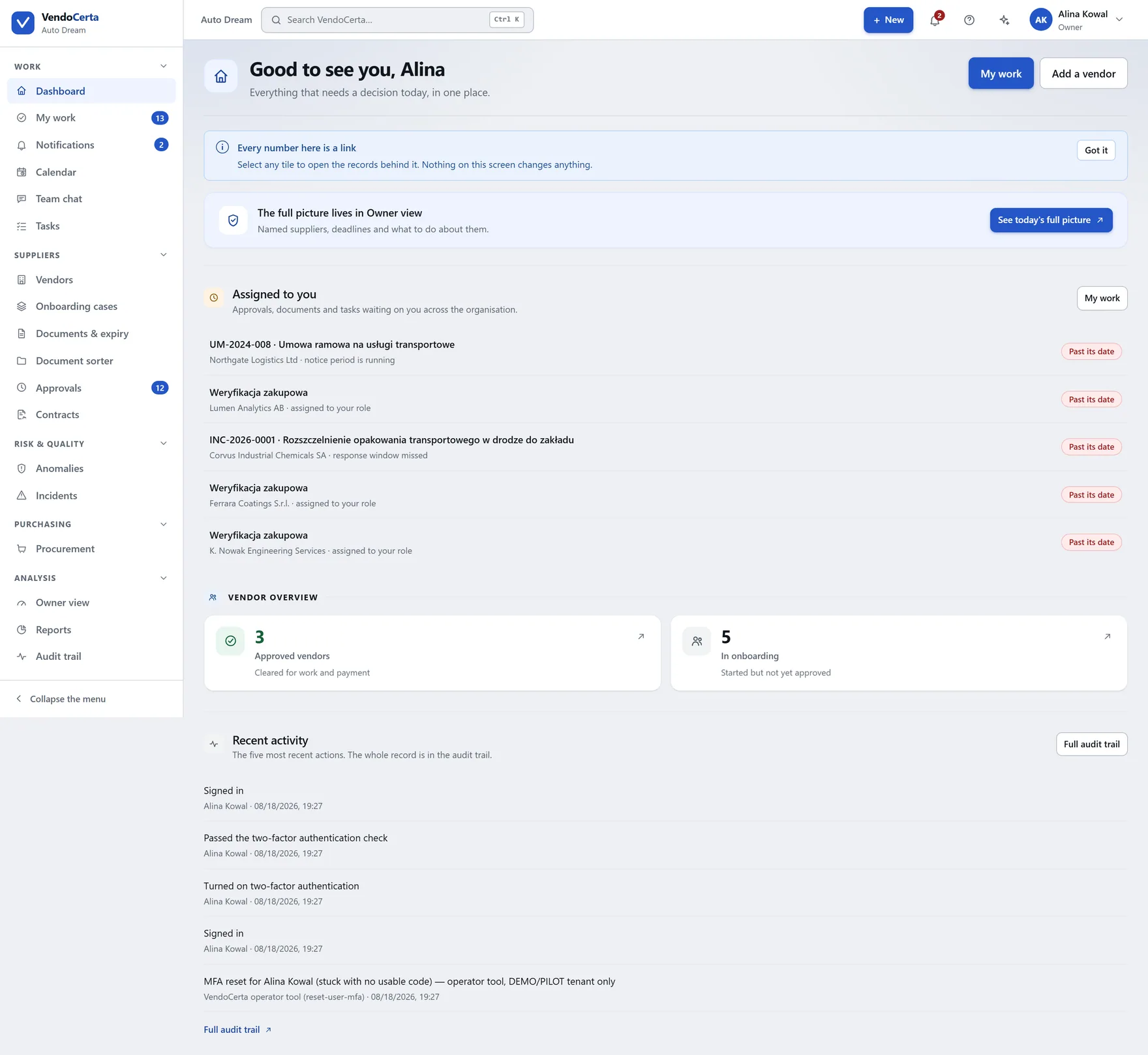
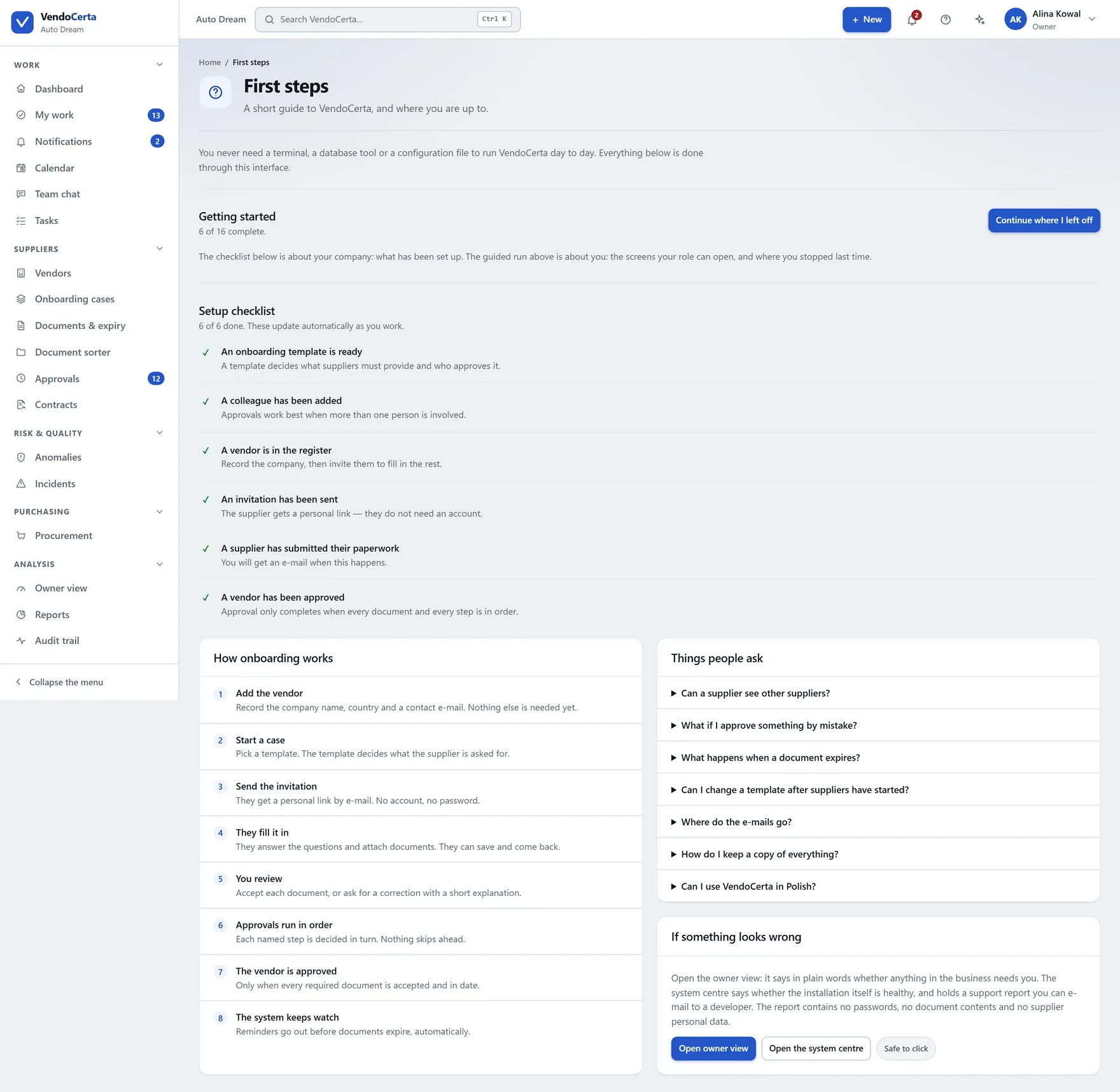
Owners and business administrators get the matters assigned to them by name. Every other role gets counters — waiting on you, overdue, missing documents, expiring within 30 days, expired. Below, recent activity across the organisation, with routine sign-ins filtered out so it does not fill up with noise.
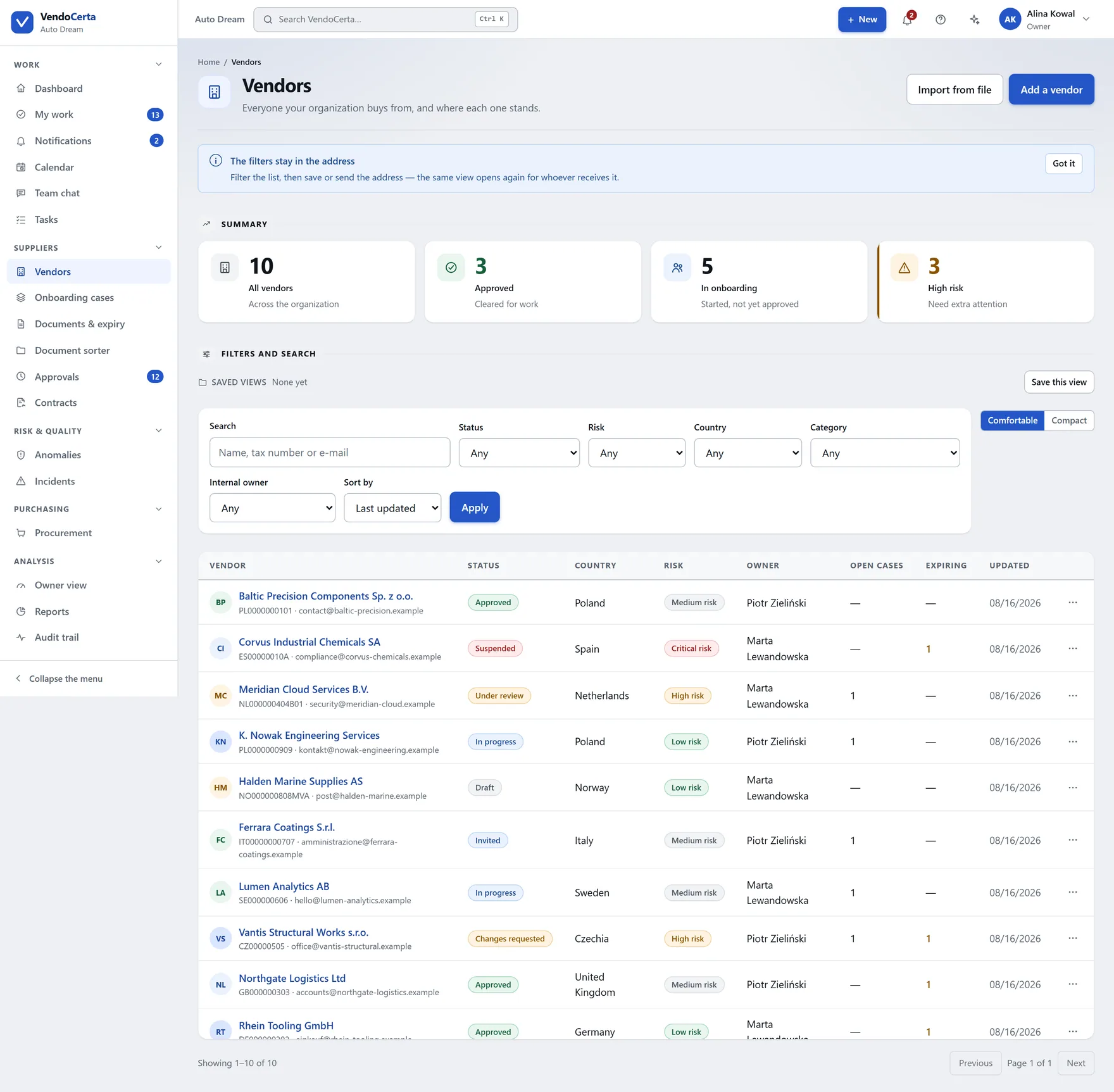
Suppliers & onboarding
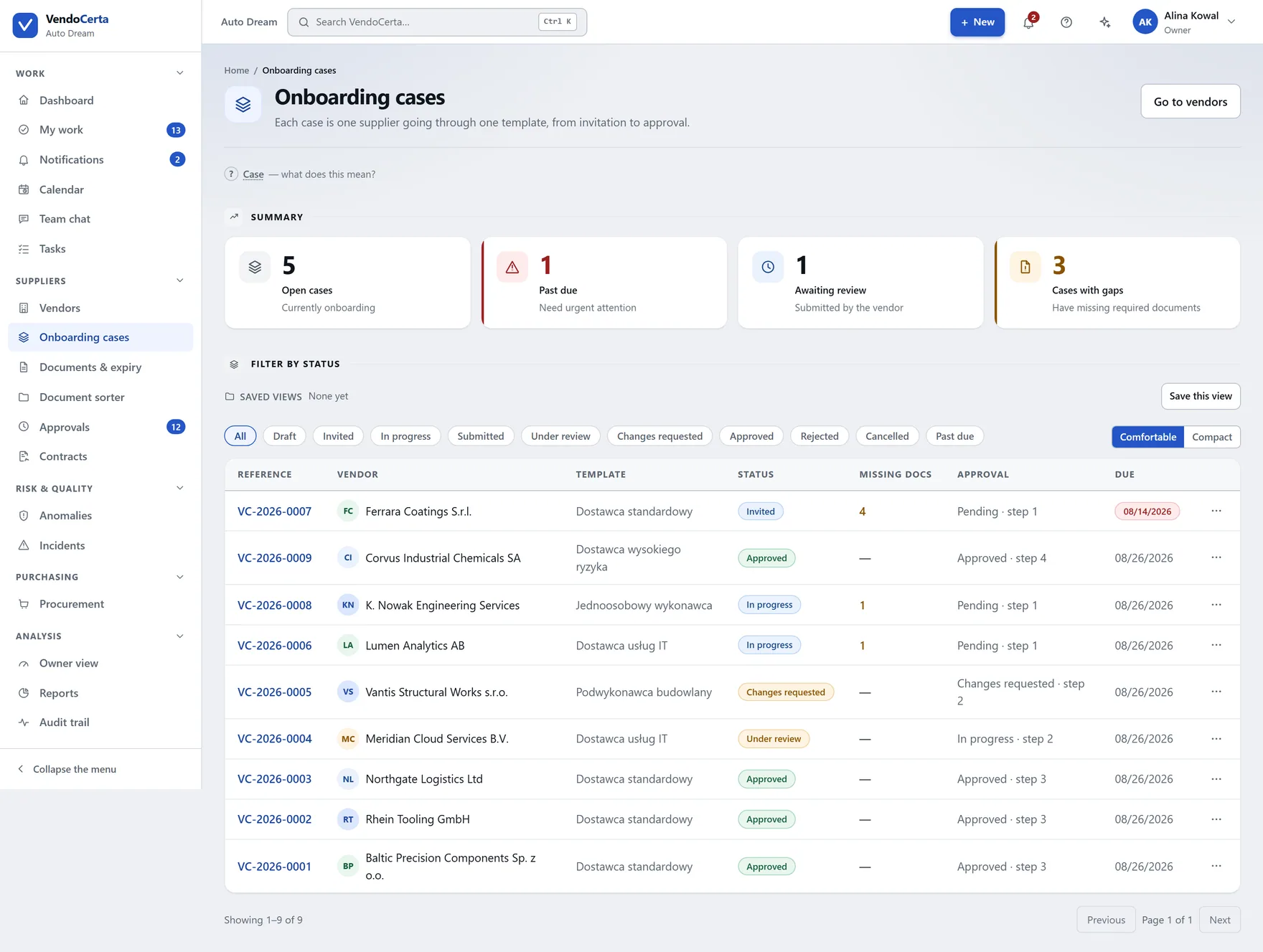
One link by e-mail, valid for a limited time, until you replace it. They fill in the form defined by your template and upload their own documents. Sending a new invitation invalidates the old one immediately — which is also how you cut off a link that went to the wrong address.
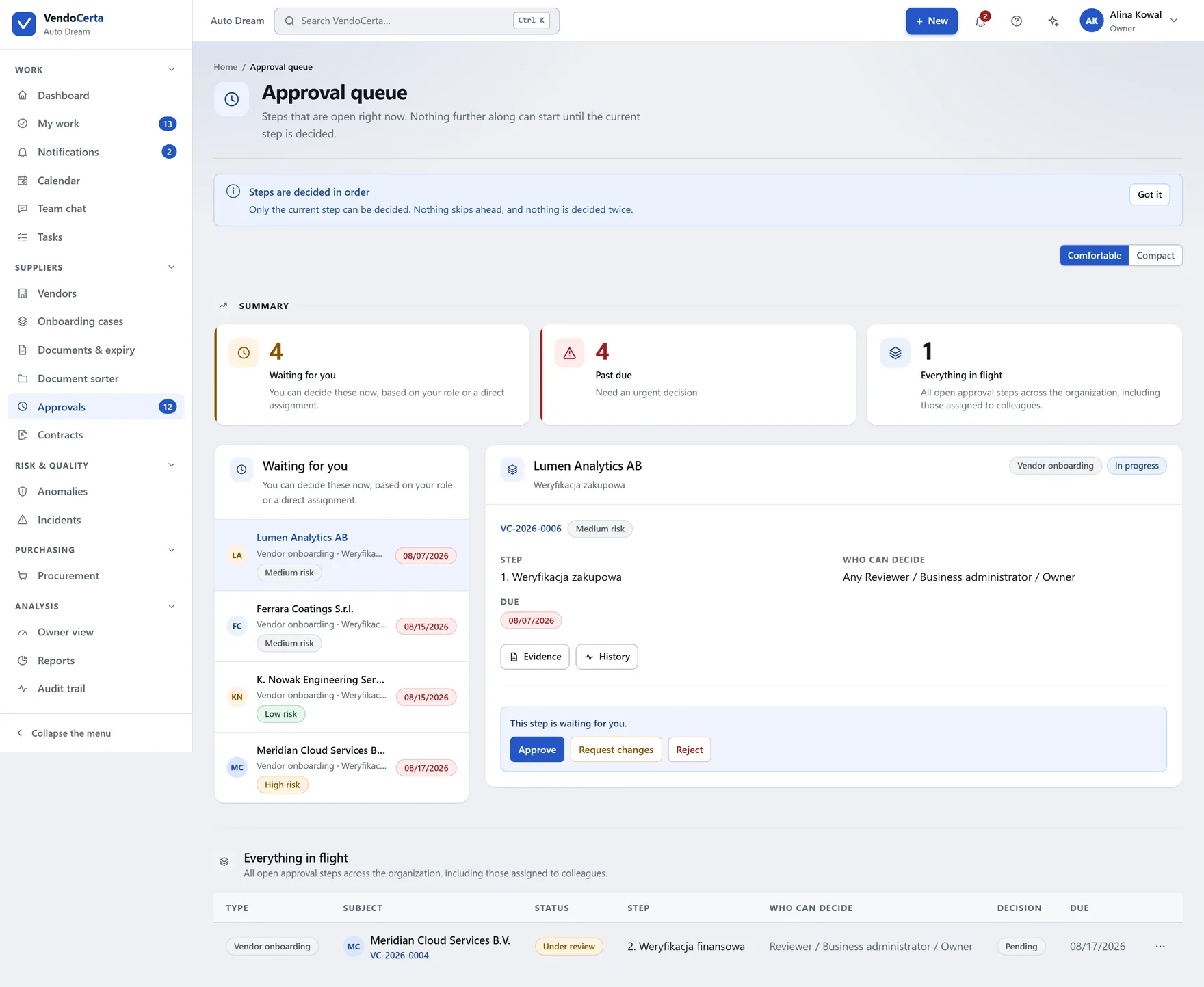
Approvals & compliance
Steps are decided in order. The next one does not open until the previous is approved and the required document is current and accepted. When something blocks a case, the product lists exactly what — the same list the assistant reads when you ask it why you cannot approve.
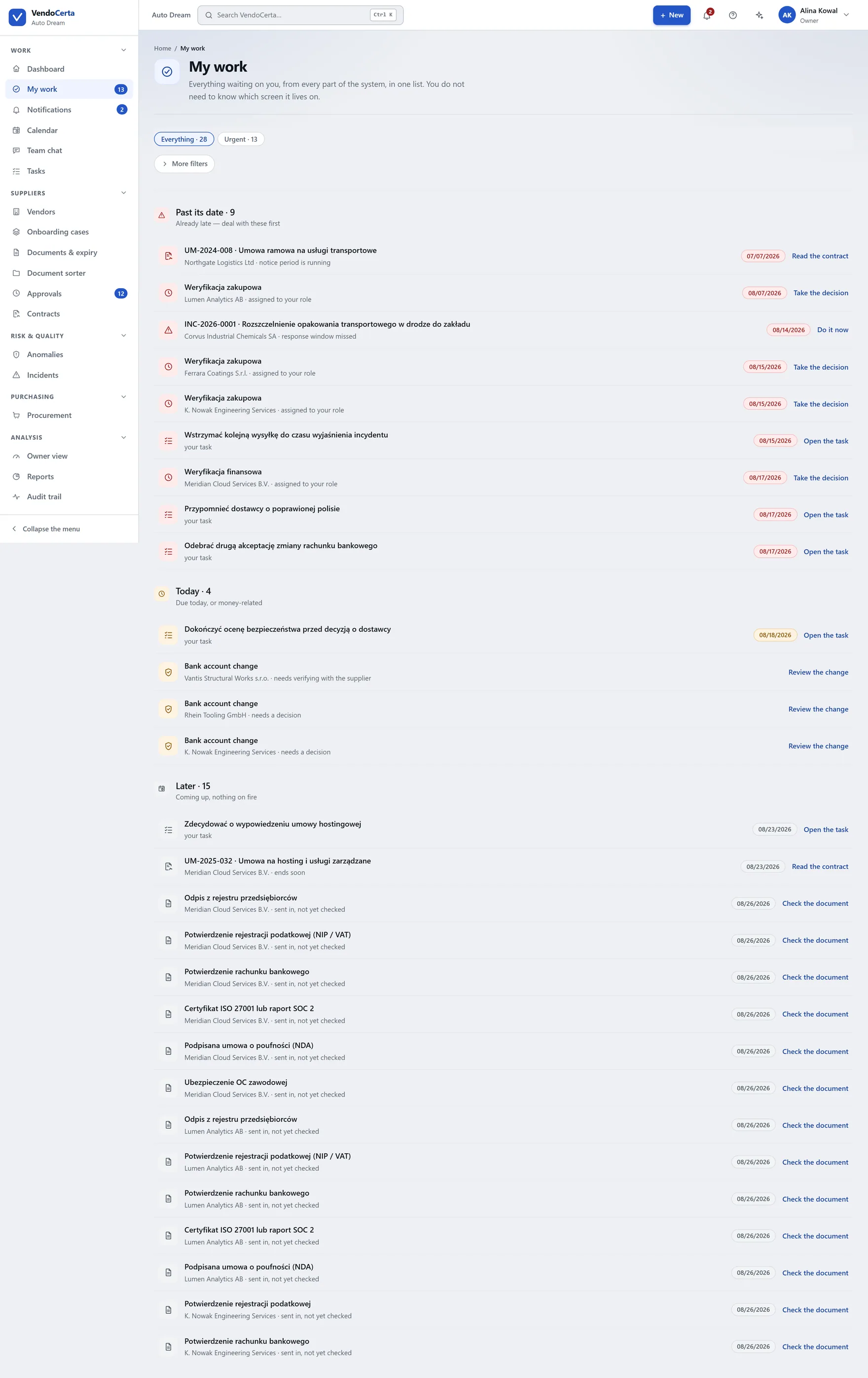
Everyday work
My work gathers everything assigned to you across approvals, documents and tasks. The calendar holds every expiry, deadline and notice period. Owner view spells the whole thing out as named suppliers and specific decisions.
Beyond onboarding
Approved suppliers are the point at which most procurement software starts. VendoCerta Plus adds the front door: a controlled intake for purchase requests, against suppliers the company has already cleared. The rest of the operations pack is named, tiered and on the roadmap — and this site labels which is which on every row.
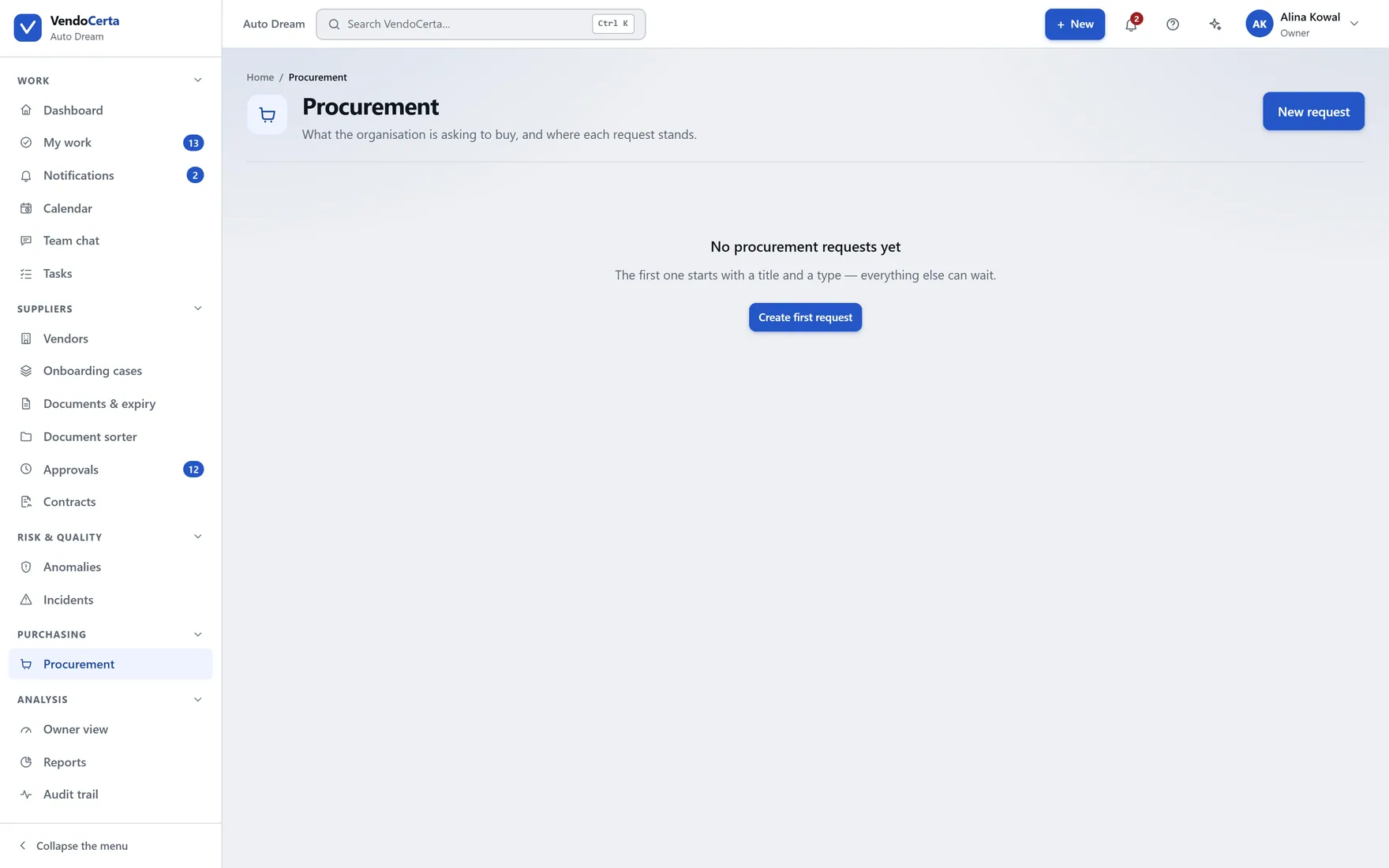
The product separates two questions that price lists usually merge: which plan includes a module, and whether that module has actually shipped. A plan naming a capability is never enough on its own to unlock it — the entitlement check refuses anything not yet marked available, no matter what the customer is paying.
So the comparison table on this site carries both columns. A row can honestly read “included in VendoCerta Plus” and “on the roadmap” at the same time.
Before you ask
No. A supplier never signs in to VendoCerta. They receive a personal link by e-mail, valid for a limited time — a week by default — and complete their form and uploads through it, returning to it as many times as they need until it expires or is replaced. No password, no account, nothing to buy.
If the link goes to the wrong address, sending a new invitation invalidates the previous one immediately, even if somebody had already opened it.
VendoCerta installs onto a machine you control. PostgreSQL, object storage and the mail preview run as portable binaries inside the project folder — nothing is installed into Windows, no administrator rights are needed, and Docker is not required (a compose file is included for machines that have it). Internet access is needed on first run only, to fetch those services.
No, and not because of a policy. There is no function anywhere in the application to edit or delete an audit entry, in any role including the owner, and nothing overwrites an existing event. The screen says so itself, under its heading. Refused access is recorded as well, so an attempt to view something without permission leaves a mark rather than nothing.
Four stages — proposal, document confirmation, independent verification, approval — with a supporting document required before a proposal can even be made, phone-only verification against a number known beforehand, and a rule that nobody who has already appeared in the case may cast the final approval. In practice that is a minimum of two distinct people, three with the default of two approvals.
It reads only within the permissions of the person asking, and it never carries out an action without an explicit confirmation from that person — permissions are re-checked at the moment of the click, not the moment of the question. It cannot approve, reject or suspend a supplier, change a role, or delete anything at all.
A licence carries a grace window. Inside it the installation stays readable — you can still open and export what you already have — but writing through a module is refused until the licence is active again. An owner reading their own records is not something a lapsed licence should take away mid-read; creating new ones is.
Yes, and it is labelled. The plan comparison shows every capability with a status — shipping, preview, or on the roadmap — beside the plans that include it. The product enforces the same distinction: a plan naming a module does not unlock it until the module is genuinely available.
The Complete User Guide and the Product Catalogue, ready to download without talking to anyone. And if you would rather see it live: a demo with a person, not a recorded webinar, is still there.